Applications · Consumer Connection & Checkout
Cannabis Store & Product Locator: Now With Add to Cart
The locator that connects a consumer’s intent to a specific, in-stock relationship with a specific store, and, with Add to Cart turned on, lets them check out for pickup without ever leaving your site.
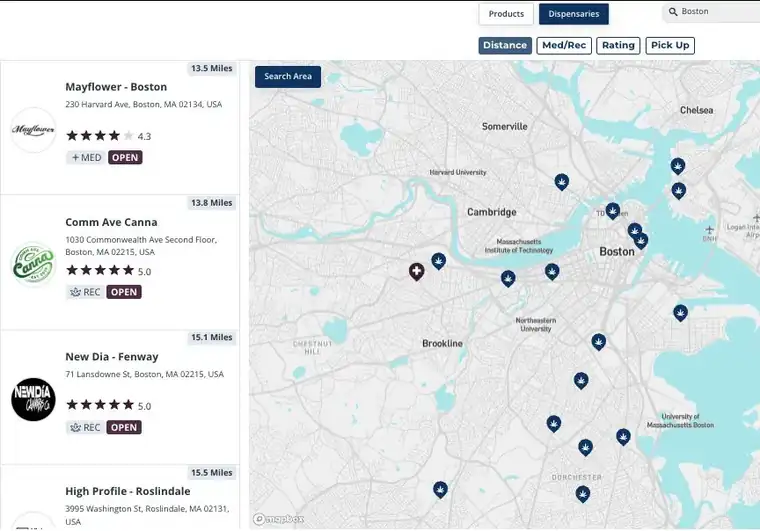
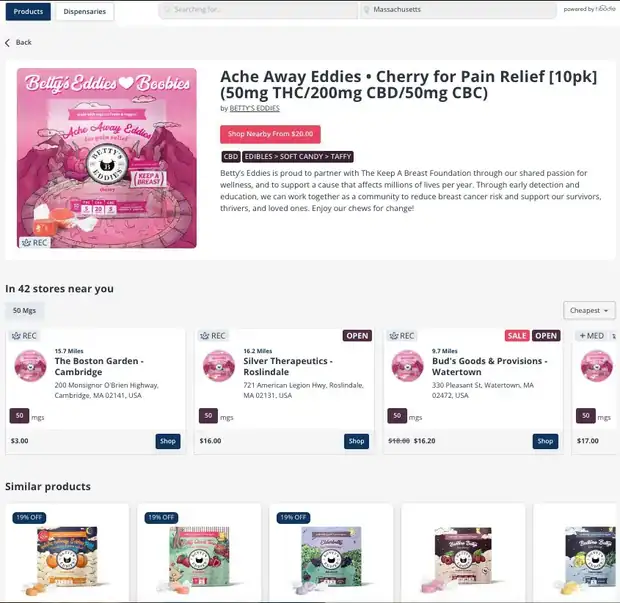
Hoodie Where-to-Buy is an embeddable store and product locator that cannabis brands add to their own websites to connect consumers directly with nearby dispensaries carrying their products. A visitor searches by location, strain, flavor, or category, and Where-to-Buy returns only the dispensaries with that specific item in stock right now, with a direct link to that store’s product listing. It is powered by the same storefront data backbone as the rest of Hoodie’s platform, so results reflect what is actually on the shelf, not a static store list. As a cannabis where-to-buy application, it works as both a cannabis store locator tool and a cannabis product locator: the embeddable dispensary finder brands drop straight onto their own site. Where-to-Buy also includes Add to Cart, an on-site checkout layer covered in full below, so once your locator is live, a shopper can go from search to a completed order without a hand-off to anyone else’s page.
The platform
From “where can I buy this” to a real store visit
Each part of Where-to-Buy is built to shorten the distance between a consumer’s intent and an actual dispensary visit.
Store locator
Consumers see which nearby dispensaries actually carry your product before they ever leave your site, not just which stores are closest.
Store Locator plots real-time dispensary results with current hours and live inventory status, filtered to locations where your product is actually stocked. Map icons, highlights, and result styling carry your brand’s own visual identity.
For brands
Turns your product page into the first stop in a real purchase path, with your branding intact end to end.
For retailers
Sends qualified foot traffic to the specific stores that already have the product in stock.

Product locator
A consumer filtering by strain, flavor, or category sees only the stores where that exact item is available, with a direct link to the retailer’s own product listing.
Product Locator narrows results to in-stock matches only, so a search never returns a dispensary that’s sold out or doesn’t carry the item. The result links straight to the dispensary’s product page, cutting down the competitor listings a shopper might see along the way.
For brands
Keeps the shopper’s attention on your product through the last click, with fewer competing items in view.
For retailers
Delivers a shopper who is already looking for a specific product they know is on the shelf.

Consumer analytics
Brands can see which retail partners the locator is actually driving traffic to, not just how many people used it.
Consumer Analytics tracks locator traffic and awareness patterns down to which stores get the most searches and click-throughs, turning distribution and promotional decisions into a read on where consumer demand is already showing up.
For brands
Directs distribution and promotional spend toward the retail relationships already converting demand.
For retailers
Gives partners visibility into how much of their foot traffic the relationship with your brand is generating.


Every Where-to-Buy result is powered by Hoodie’s shared storefront data: direct POS integrations across every legal market, refreshed daily.
Terms, defined
The vocabulary this product runs on
- Store locator conversion
- The point at which a consumer using an embedded store locator clicks through to a specific dispensary result, typically measured as the ratio of locator searches to store-page click-throughs.
- Product locator
- A search tool, usually embedded on a brand’s own website, that lets a consumer filter by attributes like strain, flavor, or category and returns only the nearby stores currently carrying that exact item.
- Add to Cart
- A checkout layer built on top of Where-to-Buy that lets a shopper complete a pickup order without leaving your site, closing the loop between an ad click and a measurable sale.
- Deep linking
- Configuring Where-to-Buy to open directly on one product’s or one dispensary’s detail page, via the embed setup or a URL parameter on the host page, instead of showing the default list view.
Included with Where-to-Buy · Programmatic Display ROAS
Add to Cart
A checkout layer for Hoodie Where-to-Buy. Shoppers browse, add items to a cart, and place a pickup order without ever leaving your site, so the ad spend that earned the click finally connects to a sale you can measure.
Add to Cart is an extension of Where-to-Buy above, not a separate product: your store & product locator needs to be live on your site first. If it already is, turning on Add to Cart is a single settings change. If you don’t have Where-to-Buy live yet, schedule a demo and we’ll get both in place together.
Add to Cart is a new capability inside Hoodie Where-to-Buy that lets a shopper go from search to a completed pickup order on your own website, with no hand-off to a dispensary page and no detour to a competing brand along the way. Because the order happens on your site, you get the shopper’s contact information for retargeting and loyalty, and a direct, trackable line from your programmatic display spend to an actual sale.


One click from ad to order
Shoppers check out on your site, not someone else’s.
A shopper who clicks through from your ad, email, or post lands on your Where-to-Buy listings, adds items to a cart, and checks out as a guest, no account required, no hand-off to a dispensary page, no detour to a competing brand along the way.
Nothing new to manage on payment
Payment happens in store at pickup.
Orders are paid in cash at the counter for now, so there’s no new payment infrastructure on your end to stand up. Each order routes to the soonest available pickup location. Delivery and scheduled pickup are already in the works.
A direct line to your customer, and your ROAS
You’re communicating directly with the shopper who bought.
Because the order completes on your own site, you keep the contact information for retargeting and loyalty, and you can finally track true return on ad spend from your programmatic display campaigns, from impression to click to sale. Here’s exactly how that attribution works.
How Add to Cart changes programmatic ROAS
From an ad impression to a sale you can measure
Impression
Programmatic display puts your ad in front of a shopper
Click
Shopper lands on your Where-to-Buy listings
Cart
Adds items and checks out as a guest, no account needed
Completed order
A pickup order placed on your own site, and a sale you can attribute back to the ad
Before Add to Cart, the path broke at Click: a hand-off to a dispensary page with no way to see what happened next. Add to Cart completes every step on your own site, so the impression that started it can be tied to the order that finished it.
Add to Cart is live today on more than half of all dispensaries, with new locations added every day. It only works where Where-to-Buy is already live on your site: Add to Cart is an extension of that product, not a standalone tool.
A direct, on-site conversion path is the piece cannabis media spend has been missing, and it changes what you can brief into your next campaign. Ask your media partner whether they can already run programmatic display against this footprint.
Limited-time offer
Free through December, if you sign up before the end of September
Hoodie is offering free trials of Add to Cart through the end of the year. Sign up before September 30 and Q4, October through December, is on us.
Who it’s for
Built for the people who own the number
Brand marketing & e-commerce teams
Embed a branded locator directly on your site so “where can I buy this” ends in a specific store, not a bounce to a search engine.
Retail partners
Receive qualified foot traffic from consumers who already know the product is in stock at your location.
Consumer / DTC teams
Give shoppers a fast, accurate path from product interest to a real store visit, without sending them to a third-party directory.
Media & growth teams
Finally get a trackable line from programmatic display spend to a completed sale, instead of a hand-off to a dispensary page.
Pricing
Priced to your footprint
Pricing varies depending on the applications you use and the number of markets you’d like access to. There is no one-size-fits-all plan: a single-state brand and a multi-state operator running all seven applications are priced differently.

FAQ
Questions about Where-to-Buy & Add to Cart
What is Hoodie Where-to-Buy?
How does Where-to-Buy know a product is actually in stock?
Most brands use a traditional store locator with a list of stores they sell to. Why not just do that?
Can Where-to-Buy match our brand’s look and feel?
What does Consumer Analytics show a brand?
Who typically uses Where-to-Buy?
Is Where-to-Buy mobile-friendly?
Can Where-to-Buy support a brand selling in multiple markets at once?
Can a “Shop now” button send someone straight to one product’s results, instead of a list?
How does Add to Cart relate to Where-to-Buy?
Do shoppers need to create an account to check out?
How does payment work?
Which dispensaries support Add to Cart today?
How does this help me track ROAS on programmatic display?
Is delivery or scheduled pickup available?
How do I turn on Add to Cart?
What does the free trial include?
Supplemental content
Go deeper
Embedding a Branded Locator: A Setup Guide
The steps to get Where-to-Buy live on your own product pages.
Learn moreHow Add to Cart Changes Programmatic ROAS
Why the checkout step is what finally makes programmatic display spend measurable in cannabis.
Learn moreWhere insights meet relationships.
From a search to a sale, without leaving your site
Already running Where-to-Buy? Turn on Add to Cart today, free through December if you sign up before September 30. Not live yet? Schedule a demo and we’ll get both in place together.
When you’re ready, we’re here.
